Radar vs Camera Launch Monitor: Which Is Better for Your Setup?
Evidence label: Research-led buyer guide.
Short answer: choose radar if your priority is taking a launch monitor to the driving range and seeing a meaningful amount of real ball flight. Choose a camera-based system if your priority is a permanent indoor bay, particularly where you want the monitor close to the hitting area rather than behind the ball. Neither technology is automatically “better” for every golfer. The better buy is the one that matches your space, use and the data you genuinely need.
This guide explains the trade-offs between radar and camera launch monitors. It is based on current manufacturer documentation and product support material, not hands-on testing of every device. Individual models, firmware, software modes and ball set-ups can change what is measured, calculated or supported, so check the current manufacturer specification before buying.
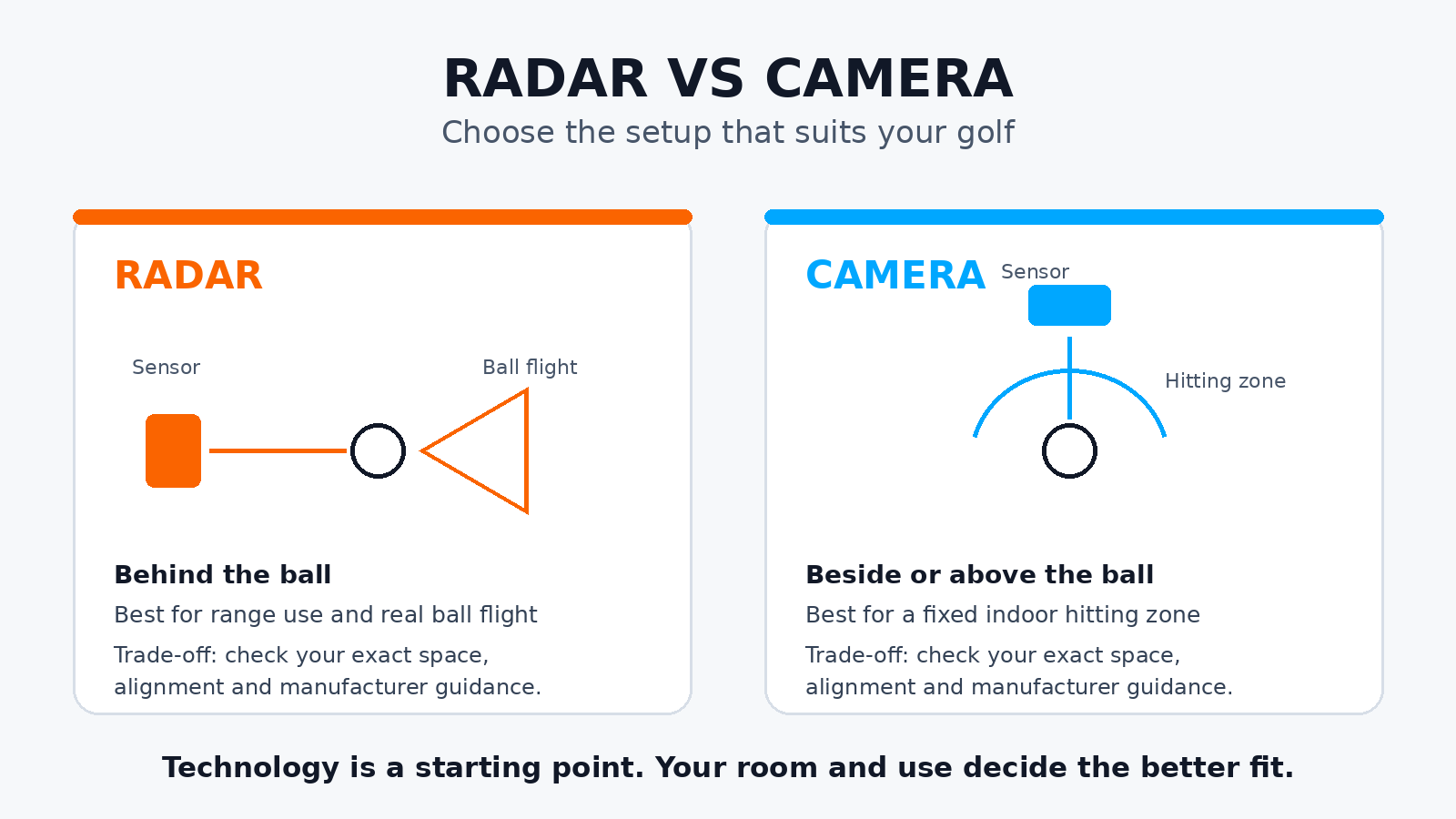
Radar vs camera launch monitor: the practical difference
Radar-based launch monitors sit behind the ball and use Doppler radar to follow movement after impact. That makes them a natural fit for outdoor practice, where the ball can travel through a longer section of genuine flight. Garmin’s Approach R10 support guidance, for example, includes separate indoor and outdoor placement advice and identifies radar as the technology used to analyse metrics including club path, launch angle and ball speed.
Camera-based, often called photometric, systems use high-speed cameras around the impact area to capture the ball and, on some models, the club. They are commonly positioned beside the ball or overhead. In an indoor simulator, that can be a practical advantage because the system does not need to sit several feet behind the player.
There is an important third category: hybrid systems. Trackman 4, for example, combines two radars and a camera. Do not buy on a technology label alone. Read the exact product’s data list, space requirements and setup guidance.
Which is better for your setup?
Choose radar first if your main use is the driving range
Best for: golfers who want to practise outside, compare shots against real ball flight and move the unit between the range and home.
The trade-off: radar normally needs clear space behind the ball and enough ball travel in front to work as intended. Indoors, the available flight length, net position and alignment matter more than many buyers expect. A radar monitor can still be a good indoor option, but room measurements and the manufacturer’s current setup guidance should be checked before you commit.
For the wider decision, see our guide to using a launch monitor outdoors and our explanation of what launch-monitor accuracy actually means.
Choose camera-based first if the indoor bay is the priority
Best for: a dedicated simulator room, garage or studio where you value a monitor near the ball, an overhead installation or a compact hitting area.
The trade-off: camera systems still need disciplined setup. The hitting zone, tee position, camera view and lighting guidance all matter. They may be less convenient to pick up for a quick outdoor range session, depending on the design. A compact indoor footprint does not remove the need for safe swing clearance, a suitable mat, net or screen, and enough room for the golfer.
If you are planning the full room rather than just the monitor, start with launch monitor vs golf simulator: what is the difference?. A simulator is the whole experience: monitor, software, display, impact solution and space. The launch monitor is one part of it.
Space and alignment are not small details
Technology choice is often presented as a simple radar-versus-camera decision. In practice, the more useful question is: can you recreate the required hitting position every time?
- Radar: plan for a repeatable position behind the ball, a straight target line and the manufacturer’s required ball flight. An offset unit, a crooked target line or a net placed too close can undermine the session.
- Camera-based: plan for the stated hitting zone and keep the ball where the system expects it. Side-mounted and overhead systems solve different installation problems, so do not assume one camera product has the same room needs as another.
- Any system: level mat, ball position, target alignment and the right settings matter. A monitor reporting numbers consistently is more useful than one with a longer spec sheet that is awkward to set up correctly.
Our launch monitor alignment guide covers the checks worth doing before judging a number or changing your swing.
Ball data, club data and calculated numbers
Every launch monitor turns captured information into a set of numbers, but the route is not identical. Some systems directly capture more of the ball’s early movement. Some use club markers or specific club-tracking hardware for particular club metrics. Others estimate selected values from the inputs they can see. Hybrid units can combine sensing methods.
That is why “does it show club data?” is not enough. Before buying, ask:
- Which ball metrics are available in the mode I will use indoors or outdoors?
- Which club metrics are measured, and which require a marked club, add-on, subscription or a particular software package?
- Are spin and strike-related figures available with my usual ball and setup?
- Which numbers will actually change my practice decisions?
For most everyday golfers, ball speed, launch, direction, carry and dispersion are a more useful starting point than chasing every available club parameter. Add deeper club data when you have a clear question it will help answer, such as a fitting decision or a repeatable path-and-face pattern.
Lighting: important, but not a simple camera weakness
Lighting deserves a setup check, not a blanket verdict. Camera-based systems need a clear view of the ball and can have product-specific lighting guidance. Radar systems have their own environmental and placement considerations. Bright sun, reflective surfaces, a dark room, a projector, an uneven target line and a poorly placed net can all affect the practical experience in different ways.
Use the manufacturer’s installation and support material for the exact monitor, then test your intended room at the times you will actually use it. Do not assume that a monitor which works well in a showroom will behave identically in a garage with a projector, side lighting and a net.
The decision checklist before you buy
- Measure the room first. Include width, ceiling height, ball-to-screen distance and the space behind the ball, not just the room’s overall length.
- Decide where you will use it most. Mostly range practice points towards radar; a fixed indoor bay often points towards camera-based or overhead options.
- Write down the data you need. Separate must-have ball data from nice-to-have club data.
- Check setup friction. Consider alignment, moving furniture, right- and left-handed players, cables and whether the unit has to be packed away after every session.
- Check the current official specification. Confirm indoor/outdoor modes, ball requirements, software, subscriptions, club-data conditions and your exact room requirements before payment.
Our verdict
Radar is usually the more natural answer for golfers who want range data and a portable outdoor practice tool. Camera-based systems are often the cleaner answer for a home simulator built around a fixed hitting zone. But the deciding factor is not the sensor name. It is whether the monitor can be positioned correctly in your real space and gives you useful, repeatable feedback there.
If your room is short or your monitor will live indoors, prioritise installation guidance and ease of setup. If you mainly practise outside, prioritise real-flight use and portable range workflow. In either case, treat broad technology claims as a starting point, then verify the exact model, firmware and mode with the manufacturer.
Radar vs camera launch monitors: FAQs
Are camera launch monitors more accurate than radar launch monitors?
Not as a blanket rule. Accuracy depends on the individual product, the metric, the environment, ball conditions and setup. Compare the exact monitor for the data and location you care about, then follow its placement instructions closely.
Can a radar launch monitor work indoors?
Yes, many can, but the required distance behind the ball and available ball flight are central to the decision. Check the current official indoor setup requirements for your chosen model before buying a net or screen.
Do camera launch monitors work outdoors?
Some do, but outdoor suitability is product-specific. Portability, power, lighting guidance and the intended hitting surface all matter. Check the manufacturer’s current specification rather than assuming every camera-based unit is an outdoor-range tool.
Which technology is best for a home golf simulator?
For a compact fixed indoor setup, camera-based or overhead systems are often easier to accommodate. For a room with enough depth and a golfer who also wants range use, radar can make sense. Measure the space and choose by setup requirements rather than price alone.